
The Shepherd’s Crook

The Shepherd’s Crook, is a blog dedicated to guiding you through the intricate world of cybersecurity while nurturing your spiritual growth. This blog aims to provide valuable insights, practical advice, and faith-based reflections to help individuals, small businesses, non-profits, and churches stay secure in the digital age.
-
Pi Day – The Cyberattack Pie: Top Cybersecurity Attack Types 2025
Every year on March 14th (3.14) people celebrate Pi Day — a day dedicated to the famous mathematical constant and, of course, actual pie. Bakeries run specials, math teachers bring dessert to class, and the internet fills with pie-themed jokes.
But while the world is talking about slices of pie, cybersecurity professionals are looking at a different kind of pie chart.
In cybersecurity, pie charts often tell an important story: how attackers are actually breaking into organizations. And when you look at the data from major 2025 breach reports, one thing becomes clear — a few slices of the “cyberattack pie” account for the majority of real-world incidents.
Recent industry threat reports show that just a handful of attack types dominate the landscape. Understanding these threats can help small businesses, churches, nonprofits, and individuals focus their defenses where they matter most.
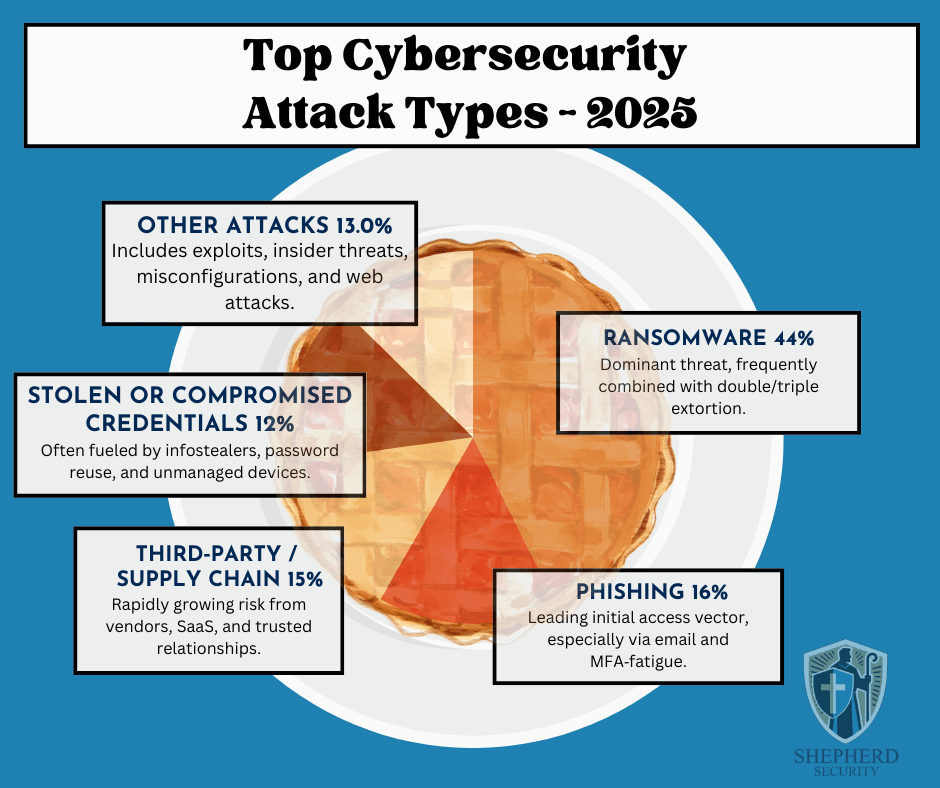
Here’s how the cybersecurity “attack pie” breaks down for 2025:
- Ransomware — 44%
- Phishing — 16%
- Third-Party / Supply Chain Attacks — 15%
- Stolen or Compromised Credentials — 12%
- Other Attacks — 13%
These figures come from a synthesis of multiple industry reports, including the IBM Cost of a Data Breach Report, Verizon’s Data Breach Investigations Report (DBIR), Mandiant M-Trends, and other threat-intelligence research.
For small businesses, churches, nonprofits, and individuals, understanding these threats is one of the most effective ways to prevent becoming the next victim.
1. Ransomware (44%) — The Dominant Cyber Threat
Ransomware continues to dominate the cybercrime landscape.
In a ransomware attack, criminals gain access to a system, encrypt files, and demand payment—often in cryptocurrency—to restore access.
What has changed in recent years is how attackers apply pressure.
Modern ransomware often uses double or even triple extortion, which means attackers will:
• Encrypt your files
• Steal sensitive data
• Threaten to publicly leak the informationFor churches, nonprofits, and small organizations, the damage isn’t just operational—it can also destroy trust within a community.
Common entry points include:
- Phishing emails
- Weak or reused passwords
- Unpatched software
- Compromised remote access systems
The takeaway: ransomware rarely starts with sophisticated hacking—it usually starts with someone clicking the wrong thing.
2. Phishing (16%) — The Front Door for Attackers
Phishing remains the single most common way attackers initially gain access to an organization.
A phishing attack is designed to trick someone into believing a message is legitimate. It may look like it comes from:
- A bank
- Microsoft or Google
- A coworker
- A pastor or ministry leader
- A shipping company
The goal is simple: get you to click a link, open an attachment, or enter your login credentials.
In 2025, phishing has become even more dangerous because attackers are using AI tools to craft emails that:
- Contain fewer spelling mistakes
- Sound more natural
- Mimic real organizations convincingly
For many organizations, phishing is the first domino that leads to ransomware or credential theft.
3. Third-Party & Supply Chain Attacks (15%) — Trust Being Exploited
One of the fastest-growing cybersecurity risks involves trusted vendors and services.
Modern organizations rely on dozens of third-party tools:
- Cloud platforms
- Payroll systems
- Donation platforms
- IT providers
- Software vendors
Attackers increasingly target these providers because compromising one trusted partner can give them access to hundreds or thousands of organizations.
If a vendor account is compromised, attackers may:
- Send malicious emails from legitimate systems
- Push malicious updates
- Access sensitive customer or donor information
This is why vendor security and access control are becoming critical parts of cybersecurity programs.
4. Stolen or Compromised Credentials (12%)
Many cyberattacks don’t involve hacking at all.
Instead, attackers simply log in using stolen usernames and passwords.
Credentials are commonly stolen through:
- Phishing emails
- Malware known as infostealers
- Password reuse across multiple websites
- Breached databases sold on dark-web marketplaces
If someone uses the same password for multiple accounts, attackers can use a technique called credential stuffing—trying that password across dozens of systems until something works.
This is why strong password practices and multi-factor authentication (MFA) are essential.
5. Other Attacks (13%)
The remaining category includes a variety of threats such as:
- Software vulnerabilities and exploits
- Insider threats
- Misconfigured cloud services
- Website attacks
- Business email compromise
While these attacks make up a smaller percentage individually, they still represent significant risk—especially for organizations without dedicated IT or security staff.
What This Means for Churches, Small Businesses, and Nonprofits
The key lesson from these statistics is simple:
Most cyberattacks succeed because of human trust and simple mistakes—not technical failures.
That means many attacks can be prevented through basic security practices.
Practical steps every organization should take include:
1. Train staff to recognize phishing
Teach employees and volunteers to slow down, verify unexpected messages, and avoid clicking suspicious links.2. Require multi-factor authentication (MFA)
This is one of the most effective defenses against credential theft.3. Use strong, unique passwords
A password manager can make this much easier.4. Keep systems updated
Patch operating systems and software regularly.5. Maintain offline or secure backups
Backups are the best defense against ransomware recovery scenarios.6. Limit vendor and account access
Only grant the minimum access necessary for systems and vendors.
The Bottom Line
Cybersecurity headlines often focus on advanced hacking groups and sophisticated attacks.
But the truth is much simpler.
The majority of breaches come down to four things:
- Someone clicked a phishing email
- Someone reused a password
- A trusted vendor was compromised
- Ransomware followed the initial access
Understanding these patterns allows organizations to focus their defenses where they matter most.
For churches, small businesses, nonprofits, and individuals, cybersecurity doesn’t have to be overwhelming.
Sometimes the most powerful protection is simply awareness, caution, and good security habits.
IBM Security. (2025). Cost of a data breach report 2025.
https://www.ibm.com/security/data-breach
Verizon. (2025). Data breach investigations report (DBIR).
https://www.verizon.com/business/resources/reports/dbir/
Google Cloud Mandiant. (2025). M‑Trends 2025: Cybersecurity insights.
https://www.mandiant.com/resources/m-trends
KnowBe4. (2025). Phishing threat trends report.
Small Targets, Big Risk: Cyber Threats During Global Escalation
Recent geopolitical tensions involving Iran rarely stay confined to physical borders. In today’s world, conflict spills into cyberspace quickly — While government and critical infrastructure sectors tend to be the focus, this affects small businesses, nonprofits, churches, and everyday individuals as well.
At Shepherd Security, we focus on practical, grounded cybersecurity. And when global tensions escalate, one of the most immediate and likely ripple effects is not missiles or malware campaigns against Fortune 500 companies.
It’s phishing.
It’s social engineering.
It’s deception that feels timely, urgent, and believable.Why Situations Like This Increase Cyber Risk
Whenever headlines are dominated by international conflict, attackers seize the moment. Fear creates urgency. Urgency overrides caution.
Cybercriminals — whether financially motivated or state-aligned — know this.
They will not usually attack your small church directly with advanced cyber weapons. Instead, they exploit something much simpler:
Human emotion.
Expect to see phishing campaigns themed around:
- “Emergency security alerts” tied to global conflict
- Fake donation requests for humanitarian aid
- Spoofed government advisories
- Bogus banking alerts claiming foreign transaction risks
- Fake news updates requiring login verification
- Vendor emails warning of supply chain disruption
These attacks don’t look evil.
They look responsible.
They look urgent.
They look like something you should click.And that’s the danger.
The Most Likely Threat: Phishing & Social Engineering
Phishing and social engineering are low-cost, high-return attack methods. They require no advanced exploit — just a convincing message.
For small businesses, nonprofits, and churches, the biggest risks include:
1. Credential Harvesting
Attackers send emails that appear to be:
- Microsoft 365 password reset notices
- Banking fraud alerts
- Payroll updates
- Donation platform verification requests
You click. You log in.
You’ve just handed them the keys.2. Business Email Compromise (BEC)
An attacker spoofs:
- A pastor requesting a wire transfer
- A board member asking for gift cards
- A vendor requesting updated ACH details
Because it feels urgent and tied to global instability, people act quickly.
3. Fake Donation Campaigns
Churches and nonprofits are especially vulnerable here. During geopolitical crises, fake humanitarian campaigns surge. Attackers may:
- Clone legitimate charity websites
- Send emails requesting emergency aid donations
- Impersonate well-known ministries
Your organization’s reputation can suffer — or your members can be financially harmed.
Why Small Organizations Are Attractive Targets
Many assume attackers focus only on governments or large corporations.
In reality:
- Small organizations often lack dedicated security teams.
- Churches frequently rely on volunteers for tech administration.
- Nonprofits prioritize mission over infrastructure.
- Individuals reuse passwords and delay updates.
Attackers know this.
And during global uncertainty, they cast a wide net.
Practical Steps You Can Take Right Now
You don’t need an enterprise security budget to reduce risk. You need discipline and clarity.
1. Enable Multi-Factor Authentication (MFA)
If your email, banking, payroll, or donation platform doesn’t have MFA enabled — fix that immediately.
MFA alone can stop the majority of credential-based attacks.
2. Slow Down Urgency
Train your team and your family:
If an email creates panic, pause.
Verify:
- Hover over links before clicking.
- Check sender domains carefully.
- Call the person directly before wiring money or buying gift cards.
Attackers rely on speed. You win by slowing down.
3. Lock Down Email
- Use strong, unique passwords (with a password manager).
- Disable legacy authentication if possible.
- Turn on login alerts.
Email is the gateway to everything else.
4. Confirm Financial Changes Out-of-Band
If someone requests:
- Wire transfer changes
- ACH updates
- New payment instructions
Verify by phone using a known number — not the number in the email.
5. Educate Your People
Security awareness doesn’t need to be complicated.
Send a simple internal message:
“Due to global tensions, we expect an increase in phishing emails. Verify unexpected requests. Do not click urgent links without confirming.”
Awareness alone reduces risk dramatically.
6. Backups Matter
While phishing is most common, destructive attacks sometimes follow geopolitical escalation.
Make sure:
- Your data is backed up
- Backups are offline or immutable
- You’ve tested restoration
Hope is not a strategy. Tested backups are.
For Individuals
If you’re not running an organization or just managing your household, you still have exposure.
- Use a password manager.
- Turn on MFA everywhere.
- Be cautious of donation links shared on social media.
- Verify news from reputable sources before clicking embedded links.
- Ignore political “exclusive” leaks sent via email or text.
And remember: legitimate organizations do not ask for gift cards.
The Bigger Picture
Cyber warfare rarely announces itself. It blends into everyday digital noise.
In times of geopolitical tension involving Iran or any nation-state conflict, most small organizations won’t face sophisticated zero-day exploits.
They’ll face something much more common:
A well-written email.
A convincing phone call.
A fake sense of urgency.
At Shepherd Security, we remind people that cybersecurity is less about paranoia and more about preparedness.
Attackers exploit emotion.
Defenders cultivate discipline.If you lead a small business, nonprofit, or church, now is the time to:
- Review your email security
- Reconfirm financial verification procedures
- Communicate clearly with your team
- Strengthen basic controls
The threat landscape shifts quickly.
But the fundamentals never change.
Stay vigilant.
Stay steady.
Protect your flock.Who to Contact After a Cybersecurity Incident
It’s a normal Tuesday morning. Coffee is warm, emails are flowing, and everything seems routine — until someone from accounting messages IT: “Hey… I can’t open any files on the shared drive. They all have weird extensions.”
Minutes later, more reports come in. Systems slow down. A ransom note suddenly appears on a workstation. Leadership starts asking questions. Anxiety rises. Is customer data involved? Are backups safe? How widespread is this?
At the same time, an individual across town faces a quieter but equally unsettling moment. A bank notification pops up about a transfer they never authorized. Then another email arrives — a password reset they didn’t request. Confusion turns to concern, then urgency.
In both cases, the first instinct is often to fix things quietly, contain the embarrassment, or hope it resolves on its own. But cybersecurity incidents rarely improve with silence. Knowing who to contact and how quickly to report an incident can dramatically affect recovery, investigation, and protection for others who might be targeted next.
That’s why understanding the proper reporting channels isn’t just good cybersecurity practice — it’s part of being responsible stewards of our data, our organizations, and each other.
Below is a practical guide to the appropriate reporting channels in the United States.
For Organizations
If your organization experiences a cybersecurity threat or breach, swift reporting is critical. Federal agencies rely on these reports to coordinate responses, track threat actors, and provide guidance to affected entities.
Report to Federal Authorities
- Federal Bureau of Investigation (FBI)
Cyber incidents such as ransomware, business email compromise (BEC), and data breaches should be reported to the FBI through the Internet Crime Complaint Center (IC3): - Cybersecurity and Infrastructure Security Agency (CISA – DHS)
CISA assists organizations in responding to cyber incidents and strengthening defenses. You can report incidents or seek assistance through:- Email: report@cisa.gov
- Phone: (888) 282-0870
- Online form: https://www.cisa.gov/forms/report
Active or Severe Incidents
If a significant security event is actively unfolding—such as:
- Major data loss
- Prolonged system outages
- Loss of control over critical systems
You should immediately contact local law enforcement or emergency responders by calling 911. Active threats may require rapid, on-the-ground intervention.
For Individuals
If you believe you’ve been the victim of a cybercrime—such as identity theft, online fraud, ransomware, or account compromise—reporting the incident helps protect both you and others.
- Internet Crime Complaint Center (IC3)
File a report with the FBI’s IC3 at:
Providing accurate details—even if the loss seems small—helps investigators identify trends and disrupt criminal operations.
Final Encouragement
Cybercrime thrives in silence. Reporting incidents isn’t just about recovery—it’s about community protection, accountability, and resilience. If something doesn’t feel right, trust your instincts and report it.
If you’re unsure how to prepare before an incident occurs, Shepherd Security exists to help educate, equip, and protect. Stay vigilant, stay informed, and don’t walk through cyber incidents alone.
When Love Is a Lie: Romance Scams and How to Protect Your Heart — and Your Wallet
Valentine’s Day is a time for roses, chocolates, and heartfelt connections, but it’s also a time when romance scammers ramp up their activity, targeting lonely hearts online. What feels like serendipity can quickly turn into heartbreak… and financial loss. At Shepherd Security, we believe in protecting both your emotional well-being and your digital life. So this February, let’s talk about what romance scams are, how they work, and how to defend yourself and others.
What Are Romance Scams?
A romance scam is a type of confidence fraud where a scammer builds a fake relationship with someone — often on a dating app, social media, or messaging service — with the ultimate goal of stealing money or personal information. The scammer typically uses stolen photos and fabricated backstories to seem attractive and trustworthy. Once trust is established, they invent urgent financial needs — medical bills, travel costs, legal fees — and start asking for cash or sensitive data.
Unlike a genuine connection growing organically, these relationships are engineered — not to be real, but to manipulate your emotions and your resources.
What Do Scammers Really Want?
Romance scammers don’t want love — they want money, access to your bank accounts, or even to use your identity for further fraud. Some scammers:
- Ask for direct cash transfers, gift cards, or cryptocurrency.
- Coerce victims into acting as money mules, forwarding illicit funds.
- Extract sensitive personal details that can fuel identity theft.
Because they’ve perfected their tactics, these fraudsters can appear genuine and caring — at least at first.
By the Numbers: A Growing Threat
Romance scams are big business for criminals — and the scale is shocking:
- In 2023, the FTC received over 64,000 reports of romance scams, with total losses exceeding $1.1 billion — making them one of the costliest categories of fraud.
- Over the last five years, reports to the FTC showed cumulative losses of about $1.3 billion.
- Malwarebytes research shows 10% of victims lose $10,000 or more, with some losing six figures.
- Nearly half of dating app users encounter fraudulent behavior; 13% lose money, averaging more than $2,000.
These figures likely underestimate the true impact — many victims are ashamed to report the scam.
Red Flags: What to Look Out For
Scammers use many tricks to build trust quickly and isolate you from support systems. Watch for these warning signs:
- Too Much Too Soon – Rapid declarations of love or affection.
- Off-Platform Requests – They insist you move conversations to email or messaging apps.
- No In-Person Meeting – Endless excuses why they can’t meet or video chat.
- Urgent Money Requests – They ask for financial help for emergencies or “opportunities.”
- Inconsistencies – Their story changes, or details don’t line up.
- Fake Profiles – Profile photos that show up elsewhere in reverse image searches.
If someone pushes for quick emotional intensity, slow down — and trust your instincts.
What To Do If You Fall for a Romance Scam
First, don’t blame yourself — even smart, cautious people can be deceived by sophisticated social engineers.
Here’s how to respond:
- Stop all contact immediately.
- Block the scammer on every platform they’ve used.
- Talk to someone you trust. A fresh perspective can help you see warning signs.
- Contact the dating site or social network where you met them — reporting helps protect others.
- Report the fraud to authorities. In the U.S., file a complaint with the FTC and the FBI’s IC3.
- Check your financial accounts for unusual activity; place alerts or freezes if needed.
- Seek emotional support. Scams can be traumatic — support groups, counselors, and victim resources can help.
Love Safely This Valentine’s Day
Valentine’s Day is about connection — not cancellation. Online dating and relationships can be fulfilling and real, but being informed and cautious is part of modern romance.
Protect your heart and your data:
- Go slow and verify identities.
- Keep personal information private.
- Engage your support network when something feels off.
Scammers don’t care about love — only they care about what they can take from you. But with awareness and preparation, you can enjoy Valentine’s Day with confidence.
2026: New Year, New Passwords
As the calendar turns and we welcome a new year, many of us take time to reflect, reset goals, and recommit to better habits. We clean out inboxes, update resumes, and resolve to take better care of our health. Yet one critical habit is often overlooked: password hygiene.
At Shepherd Security, we believe good cybersecurity is a form of good stewardship. Just as we are called to be faithful with what we’ve been entrusted, we’re also responsible for protecting our digital lives, our families, our churches, and our businesses.
Why the New Year Is the Right Time to Update Passwords
Cybercriminal don’t take holidays—and they certainly don’t respect New Year’s resolutions. In fact, compromised credentials remain one of the most common causes of data breaches year after year.
If you’ve reused passwords, relied on simple phrases, or haven’t changed key credentials in a long time, the new year is the perfect moment to start fresh. Think of it as a digital reset: closing old doors, reinforcing weak locks, and recommitting to wise security practices.
“Whoever is faithful in little is faithful also in much.” — Luke 16:10
Passwords may seem small, but they protect much.
Common Password Mistakes to Leave Behind
As we move into a new year, here are a few habits worth leaving in the past:
- Reusing the same password everywhere – One breach should not open every door.
- Short or predictable passwords – Names, birthdays, and common phrases are easily guessed.
- Never changing passwords – Especially for email, banking, and administrative accounts.
- Skipping multi-factor authentication (MFA) – Passwords alone are no longer enough.
If any of these sound familiar, you’re not alone—but now is the time to improve.
What a “Strong” Password Really Means Today
A strong password in 2026 isn’t just complex—it’s unique and managed wisely.
Here’s what we recommend:
- Use long passphrases (14+ characters) rather than short, complex strings
- Make every password unique to each service
- Store passwords in a reputable password manager
- Enable multi-factor authentication wherever possible
A password manager allows you to create strong, unique passwords without needing to remember them all. This isn’t laziness—it’s wisdom.
Don’t Forget These Critical Accounts
If you’re going to change passwords, prioritize these first:
- Email accounts (personal and work)
- Financial accounts (banking, credit cards, payment apps)
- Cloud services (Google, Microsoft, Apple)
- Social media accounts
- Website admin and hosting credentials
Email deserves special attention: if an attacker controls your email, they can often reset passwords everywhere else.
A Shepherd’s View of Cybersecurity
At Shepherd Security, we often remind readers that cybersecurity is not just a technical issue—it’s a trust issue. When data is breached, people are affected. Families, congregations, and small organizations often bear the cost.
Practicing good password hygiene is one way we care for others and reduce unnecessary risk. It’s a quiet discipline, but an important one.
Make It a Resolution That Sticks
Instead of saying “I should really fix my passwords someday,” set aside 30–60 minutes this week:
- Choose and set up a password manager
- Update your most important accounts
- Turn on MFA
- Write down a recovery plan and store it securely
Small, intentional steps now can prevent major problems later.
Final Thoughts
A new year brings new opportunities—and new threats. By starting the year with stronger passwords and better habits, you’re choosing wisdom, stewardship, and care for what you’ve been given.
From all of us at Shepherd Security, may your year be secure, resilient, and well-guarded.
“The prudent see danger and take refuge.” — Proverbs 27:12
Fall Into Cybersecurity: Best Practices for this Fall Season
Fall is here—the air is crisp, leaves are changing, and routines are settling back in. Just as we prepare our homes for cooler days by cleaning gutters, sealing windows, and storing up for the winter, we should also take time to strengthen our digital defenses.
Cyber threats don’t take a holiday. In fact, scammers often take advantage of seasonal busyness, shopping deals, and upcoming holidays to trick people. As God calls us to be wise and watchful, we can apply that same vigilance to protecting our digital lives.
Here are some fall-inspired cybersecurity best practices:
Rake Away Old Passwords
Like raking leaves, clear out weak or reused passwords. Use strong, unique passwords for each account. A password manager can help you stay organized.Don’t Be Spooked by Scams
Phishing emails and fake holiday deals are common this time of year. Be discerning—slow down before clicking links or giving out information. As 1 Peter 5:8 reminds us, “Be alert and of sober mind. Your enemy the devil prowls around like a roaring lion looking for someone to devour.”Patch and Protect
Farmers harvest and store crops in the fall, ensuring they last through winter. Likewise, keep your devices healthy by installing software updates, antivirus patches, and security fixes.Gather with Gratitude, Share with Caution
As families share meals around the table, be mindful of what you share online. Don’t overshare personal details, travel plans, or sensitive information that scammers can use.Back Up Your Harvest
Just as we store fruits and vegetables and other crops for the months ahead, you should back up important files to the cloud or a secure drive. If disaster strikes, you’ll have your digital harvest safe.Cybersecurity isn’t just about protecting data—it’s about being good stewards of what God has entrusted to us. By staying watchful and wise, we not only safeguard our own lives but also protect our families, communities, and ministries from harm.
Let’s “put on the full armor of God” (Ephesians 6:11) this fall—not only in our spiritual walk, but also in the way we protect ourselves online.
As we prepare for colder days and give thanks for God’s harvest, let’s remember that just as He provides for our physical needs, He also calls us to walk wisely in every part of life—even online. Protecting ourselves and others from harm is part of loving our neighbor and being good stewards of what God has entrusted to us.
Heavenly Father,
Thank You for this season of change, for the beauty of fall, and for the reminder that You are faithful in every season. Give us wisdom and discernment to guard our hearts, our homes, and our digital lives. Help us to stay alert against the enemy’s schemes and to use technology in ways that honor You. Protect our families, our communities, and all that we do online.
In Jesus’ name, Amen.Beware of Scams Exploiting the Death of Charlie Kirk
When tragedy strikes, criminals waste no time taking advantage of people’s grief, shock, and compassion. The recent assignation of Charlie Kirk has not only left many saddened but has also created a dark opportunity for attackers and scammers. Our heart hurts for the people of this nation and world righting now, but we have a mission to educate and protect you and want to warn you about the schemes and attacks you may encounter in the days ahead.
Common Scam Tactics Already Circulating
- Fake Donation Pages
Fraudsters often set up websites or GoFundMe-style pages claiming to raise money for Charlie Kirk’s “family” or “foundation.” Many of these are fraudulent. Always verify the source directly with official organizations before giving. - Phishing Emails & Texts
You may receive messages urging you to “click here to donate” or to “watch Charlie Kirk’s final words.” These links often lead to malicious sites that can steal your personal information, install malware, or compromise your accounts. - Social Media Impersonation
Scammers create fake social media accounts pretending to be Charlie Kirk’s family, staff, or close friends. They may send direct messages asking for donations or pushing links. If you see a post or account that doesn’t come from an official, verified source, be skeptical. - Merchandise & Memorabilia Sales
Some criminals may claim to be selling “limited edition” memorial merchandise, such as T-shirts, books, or autographed items. Often, buyers never receive the product—or worse, they hand over credit card details to thieves. - Fake News Articles & Videos
Clickbait headlines like “Truth About Charlie Kirk’s Death” or “What They’re Not Telling You” are designed to lure clicks and often lead to adware or malicious downloads. Always check with trusted media outlets for facts.
How to Stay Safe
- Pause before you give. Verify donation sites before contributing.
- Check URLs. Look for misspellings or odd web addresses.
- Don’t click unknown links. Especially in emails, texts, or DMs.
- Report suspicious activity. Help protect others by flagging fake accounts and scam pages.
A Closing Prayer
Father God,
We lift up our nation and all those grieving the loss of Charlie Kirk and the turmoil going on in the world at the moment. In this moment of sorrow, we ask for Your protection against those who would exploit tragedy for personal gain. Grant us wisdom to discern truth from deception, and strength to stand firm in faith and integrity. May Your light shine in the darkness, bringing peace, comfort, and security to Your people. In Jesus’ name, Amen.Remembering Charlie Kirk: Defending Truth in a Time of Violence
We live in a time when courage is costly, and when speaking up for truth can draw both admiration and attack. Today we remember Charlie Kirk—his life, his mission, and the ultimate price he paid. In his death there is a powerful witness: to the cost of truth, the danger to dissent, and the sovereign refuge in God even amid senseless violence.
What Happened
On September 10, 2025, Charlie Kirk was speaking at Utah Valley University engaging students, debating ideas when he was shot in the neck. He was rushed to the hospital, but his life was lost.
A Witness to Truth
Charlie Kirk, whether one agreed with him or not (I take the stand that he spoke the truth), was someone who believed in speaking forcefully. He believed deeply in free speech, in standing up for what he saw as conservative and Christian values, in mobilizing young people, and in confronting what he considered moral decline in society. He was a public figure, not shy of controversy.
In many ways, he put his life on the line—not by seeking martyrdom, but by refusing to stay silent in a climate where speakers are threatened, ideas are censored, and safety is sometimes compromised for standing up. His speaking tour, his debates, his media presence—all were part of a posture that truth matters. Even when the cost is high.
Faith, Truth, and the Cyber Age
For those of us who are Christians and who are passionate about cybersecurity, about defending people online and defending truth in digital spaces, there are several lessons here:
- Truth baits attack. Those who speak truthfully—or think they do—often become targets. Be it through online harassment, doxxing, threats, or worse. We see this in ideological battles, in political discourse, even in academic settings. The digital age amplifies both speech and harm.
- We must protect the protectors. Speaking truth requires courage, and sometimes vulnerability. As a community, we owe it to those willing to speak—to help secure their platforms, protect their speech, help them navigate threats, and pray for their safety.
- Faith anchors hope. Even when injustice seems overwhelming, when violence cuts short a life, the Christian hope is not in human vindication but in a sovereign God who sees every deed, hears every prayer, and who promises justice. As Scripture reminds us, “For we do not wrestle against flesh and blood, but against rulers… against spiritual hosts of evil.” (Ephesians 6:12)
- Truth must be spoken in love. Because truth is powerful, but often divisive. The way we speak—tone, humility, charity—matters deeply. Our call is to be kind as we are bold, to hold convictions without malice, to seek restoration more than victory.
Mourning and Moving Forward
We mourn Charlie Kirk’s death. We mourn the violence. We mourn the divisions in our nation. But we also mourn for a culture that too easily resorts to silencing by force, that too often confuses disagreement with threat, that too frequently forgets that every human is made in the image of God, even those who hold views we find wrong or dangerous.
In memory of Charlie, let us recommit ourselves—those of us working in cybersecurity, those who care about free speech, those who believe in Christ—to:
- Guarding the online spaces where truth is shared, so that ideas can be debated without dehumanization.
- Supporting those who choose the difficult path of speaking out, including offering prayer, counsel, and practical protection.
- Pursuing truth, even when unpopular.
- Trusting God’s justice, even when earthly justice seems delayed or incomplete.
A Prayer
Father God,
We pray today for Charlie Kirk’s family, friends, and community—comfort, peace, and strength that only You can give.
We pray for the hurting, for the wounded in spirit, and for our divided nation.
Help us to hold fast to truth, even when it costs something.
Let us be lights in darkness—people who speak with boldness, act with love, and walk humbly with You.
May Your truth prevail, Your people be protected, and Your justice roll on like a mighty river.
In Jesus’ name, Amen.Charlie Kirk died doing what he believed in: engaging people, challenging ideas, defending what he held to be truth. May his story remind us of how precious truth is, how fragile life is, and how dearly we must work—in faith, courage, and love—to protect both.
Protecting Your Child’s Privacy When Going Back to School
Back-to-school season is filled with excitement—new teachers, new friends, and new opportunities to learn and grow. But in today’s digital world, it also brings new risks. From online accounts for homework to apps that track grades and communication platforms between schools and parents, our children’s personal information is being collected more than ever.
As parents, God calls us to shepherd and protect the children entrusted to our care—both in the physical world and the digital one. Here are some practical ways to safeguard your child’s privacy this school year:
1. Limit What You Share Online
The first day of school photo is a tradition many families love. But be careful—posting pictures in front of your house, bus stop, or with your child’s school name/logo visible gives away personal details. Instead, share pictures privately with close family, or crop out identifiable information before posting.
2. Review School Apps and Portals
Schools increasingly use apps for assignments, grades, and communication. Before logging your child in, review the app’s privacy policy. Ask:
- What data is being collected?
- Who has access to it?
- How long is it stored?
If something feels invasive, ask your school about alternatives.
3. Teach Your Child Safe Online Habits
Just as Proverbs reminds us to “train up a child in the way he should go” (Proverbs 22:6), teaching digital wisdom early is crucial. Show your child how to:
- Use strong, unique passwords
- Log out of shared devices
- Avoid clicking suspicious links or attachments
- Tell you right away if something online feels “off”
4. Watch Out for Over-Sharing in Class Projects
Some assignments may ask children to share personal details (like favorite places, family info, or daily routines). Help them give thoughtful answers that don’t reveal too much, especially if these projects are posted online or in shared digital classrooms.
5. Secure Their Devices If your child uses a laptop or tablet for school, add extra layers of protection:
- Enable parental controls and safe search filters
- Keep software and antivirus up to date
- Use strong Wi-Fi passwords at home
- Teach your child not to use public Wi-Fi without a VPN
6. Communicate with Teachers and Staff
Don’t be afraid to ask how the school protects student data. FERPA (Family Educational Rights and Privacy Act) gives you rights over your child’s information. Request clarity on who can access records, photos, or online accounts.
7. Pray for Protection and Wisdom
Technology will always carry risks, but we are not alone in guiding our children through them. Pray for discernment as a parent and for your child’s safety—online and offline. As Psalm 121:7-8 reminds us:
“The Lord will keep you from all harm—he will watch over your life; the Lord will watch over your coming and going both now and forevermore.”Final Thought
Back-to-school season is a wonderful time of growth and opportunity. By being intentional about privacy and security, you can give your child the tools to thrive while staying safe. Protecting them online is just another way we shepherd their hearts and minds in today’s connected world.
If you have any questions regarding how to protect yourself better from cyber attacks or have a small business or organization that needs help moving in a more security-minded direction, please feel free to reach out to us and we can see have we can better serve you and our community.
God bless, and keep yourself and your flock safe
John Johnson
Shepherd SecurityStaying Secure on the Go: Cybersecurity for Traveling
Whether you’re traveling for work or rest, it’s hard to unplug completely from technology. The more connected we are, the more we expose ourselves to cyber risks, especially on the road. But as followers of Christ, we don’t live in fear—we live with wisdom. Proverbs 22:3 reminds us, “The prudent see danger and take refuge, but the simple keep going and pay the penalty.” So in this article, we’re covering common travel-related cyber threats and simple ways to stay secure wherever your journey takes you. Plus, you can download our free Travel Security Checklist
Common Cyber Risks While Traveling
1. Unsecure Wireless Networks, Public Devices & Charging Stations
- Public Wi-Fi: Airports, hotels, coffee shops—all convenient, but often unprotected. Hackers can set up fake hotspots (called “Evil Twins”) to intercept your data. Always verify network names with staff and avoid entering sensitive info over public networks.
- Public Computers: Hotel business centers and cyber cafés might be infected with keyloggers—software that silently records every keystroke, including your passwords. Avoid logging into accounts or accessing private data on these machines.
- Charging Stations (“Juice Jacking”): Some USB stations may be altered to steal data. Instead:
- Use a data blocker (available online for $10–15).
- Bring a portable battery bank.
- Plug your phone into your own laptop, not public ports.
2. Device Theft
Travelers are common targets, especially during meal times or at busy events like conferences. Don’t leave laptops or devices unattended—even in hotel rooms.
3. Phishing and Social Engineering
When you announce your trip on social media or via out-of-office emails, scammers take note. They may craft fake airline alerts, hotel updates, or financial warnings. Always:
- Check sender details.
- Avoid clicking suspicious links.
- Go directly to official websites when in doubt.
4. Cyber Threats at Your Destination
Research the digital climate of your travel destination. Some countries are hotspots for cybercrime. Others may criminalize content that is legal in the U.S., including religious materials. Be wise about what you store or access while abroad.
Before You Go: A Cybersecurity Packing List
Prepare as intentionally as you would for a mission trip or vacation.
- Travel Light: Bring only the devices you truly need.
- Check Your Settings: Review privacy settings and disable location tracking where possible.
- Update Your Devices: Enable automatic updates to stay protected against known vulnerabilities.
- Back Up Your Data: Store important files in the cloud or on an external hard drive—ideally both.
- Enable “Find My Device”: In case of loss or theft, you can locate or wipe your device remotely.
- Use Strong Passwords + Lock Screens: Set up PINs, facial recognition, or fingerprint unlocks.
- Enable Multi-Factor Authentication (MFA): Especially for your email, banking, and social apps.
Get our free Travel Security Checklist below
While You’re There: Stay Vigilant
- Turn Off Auto-Connect: Disable auto Wi-Fi and Bluetooth connections.
- Think Before You Connect: Confirm network names with hotel/airport staff. Avoid sensitive transactions on public Wi-Fi.
- Be Cautious with Clicks: Don’t download apps or click links you didn’t ask for.
- Guard Your Gear: Never leave your devices out of sight in taxis, airports, or hotel rooms.
Social Media: Post Wisely
Oversharing invites risk—both cyber and physical.
- Delay posting vacation pics until you’re back home.
- Avoid tagging your location in real time.
- Review and tighten your account security settings.
- Enable MFA on all your social accounts.
Travel can be a refreshing gift from God, but it comes with new responsibilities. Just as we lock the doors of our homes when we leave, we must also secure our digital lives as we go. Technology can be a powerful tool for connections, but we’re called to steward it wisely.So whether you’re heading to a conference, a mission trip, or just taking some time off—travel smart, stay alert, and trust God as your ultimate protector.
“The Lord will keep you from all harm—He will watch over your life; the Lord will watch over your coming and going both now and forevermore.” – Psalm 121:7-8
The Security of Our Spiritual Identity in Jesus: Reflections for Good Friday and Easter
As we approach Good Friday and Easter, it’s a time for deep reflection on the significance of what Jesus accomplished on the cross. Here at Shepherd Security, we not only want to help your protect yourself and your identity in the digital would, but as well as help you protect yourself and your identity in the spiritual world. In today’s digital age, where cyber security is a pressing concern, we can draw profound parallels between the protection of our digital identities and the security of our spiritual identity in Jesus Christ.
The Vulnerability of Our Digital and Spiritual Lives
In the realm of cyber security, we are constantly aware of the threats that seek to compromise our personal information. Hackers, malware, and phishing attacks are just a few of the dangers that can lead to identity theft and data breaches. Similarly, our spiritual lives are under constant threat from forces that seek to undermine our faith and lead us astray. Temptations, doubts, and the pressures of the world can all erode our spiritual identity if we are not vigilant.
The Ultimate Security System: The Cross
Just as we rely on robust security systems to protect our digital identities, we have an even more powerful safeguard for our spiritual identity: the cross of Jesus Christ. On Good Friday, we remember the ultimate sacrifice that Jesus made for us. By dying on the cross, He took upon Himself the sins of the world, providing a way for us to be reconciled with God. This act of love and redemption is the foundation of our spiritual security.
“He himself bore our sins” in his body on the cross, so that we might die to sins and live for righteousness; “by his wounds you have been healed.”
– 1 Peter 2:24The Resurrection: Proof of Our Secure Identity
Easter Sunday is a celebration of Jesus’ victory over death. His resurrection is the ultimate proof that our spiritual identity is secure in Him. Just as a strong password protects our online accounts, the resurrection assures us that nothing can separate us from the love of God. Our identity in Christ is unshakeable, and we are given new life through His resurrection.
Living in the Security of Christ
In our daily lives, we take steps to protect our digital identities by using strong passwords, enabling two-factor authentication, and staying informed about the latest security threats. Similarly, we must take steps to strengthen our spiritual identity. This includes regular prayer, reading the Bible, participating in fellowship with other believers, and staying grounded in the truth of God’s Word.
“If you declare with your mouth, “Jesus is Lord,” and believe in your heart that God raised him from the dead, you will be saved.“
– Romans 10:9As we reflect on Good Friday and Easter, let us be reminded of the incredible security we have in Jesus. His sacrifice on the cross and His resurrection provide us with an unbreakable spiritual identity. In a world full of uncertainties and threats, we can rest assured that our identity in Christ is eternally secure.
May this season be a time of renewed faith and confidence in the security that Jesus provides. Keep your flock safe! Happy Good Friday and Easter!
A Call to Be Good Stewards of God’s Resources: Security Memo to Church Leaders (or other Leaders)
Dear Church Leader (or other leaders)
This blog post is for you. As a pastor and security professional, I recently received an alarming amount of reports regarding someone impersonating me and sending out phishing emails to my congregation and other members in the community, asking them to purchase gift cards.
Just because I’m also in Cybersecurity, doesn’t mean I’m not above being susceptible of being compromised. Heck Troy Hunt who is a highly regarded professional in cybersecurity recently wrote about how he recently fell for a phishing email (Read Troy’s blog article A Sneaky Phish Just Grabbed my Mailchimp Mailing List) I have safeguards and alerting in place, so I am fairly confident that I’m not in any sort of compromise. (but isn’t that what all compromised people say?)I have seen this email address circulating in my congregation a few months ago, so I believe this attacker got ahold someone’s account who has all these contacts, including mine, that was compromised and now their contact, context, and the structure of the church is exposed. As they had discovers that I and the other pastor that was impersonated a few months back, have influence on people. We ask people to do stuff, and imagine that, they do it. This is a common phishing email tactic, because the attacker is abusing the trust that is in place.
This incident serves as a stark reminder of the importance of cybersecurity for church leaders (including myself), business leaders, and really anyone. In today’s digital age, we must be vigilant and proactive in protecting the resources God has entrusted to us. I have my member’s information, names, contacts, and some instances of sensitive information. I’m also a admin of many systems for my church. This is information that these people of my church has entrusted me with.
The Importance of Cybersecurity
Cybersecurity is not just a technical issue; it is a matter of stewardship. As leaders, we are called to be good stewards of the resources and people under our care. This includes safeguarding sensitive information and ensuring that our congregation and business are protected from malicious attacks. Phishing scams, like the one my congregation experienced, can lead to financial loss, identity theft, and a breach of trust. It is our responsibility to take proactive measures to prevent such incidents.
Practical Steps to Enhance Security
- Educate Your Community: One of the most effective ways to prevent phishing attacks is through education. Inform your congregation and employees about the dangers of phishing and how to recognize suspicious emails. Encourage them to verify the authenticity of any request for personal information or financial transactions.
- Implement Strong Authentication: Use multi-factor authentication (MFA) for all accounts, especially those with access to sensitive information. MFA adds an extra layer of security by requiring users to provide two or more verification factors.
- Regularly Update Software: Ensure that all software, including antivirus programs and operating systems, are regularly updated. Updates often include security patches that protect against known vulnerabilities.
- Monitor and Respond to Threats: Establish a system for monitoring and responding to potential security threats. This can include setting up alerts for suspicious activity and having a response plan in place for dealing with breaches.
- Secure Communication Channels: Use encrypted communication channels for sensitive information. This ensures that data transmitted between parties is secure and cannot be intercepted by malicious actors.
- Conduct Regular Security Audits: Regularly review and audit your security practices to identify and address any weaknesses. This can include assessing your network security, reviewing access controls, and testing your incident response plan.
- Relation and Trust: Build that relationship and trust with the people under your leadership. If there is trust, there may be a good chance your members will feel comfortable with questioning a suspicious request made by you. If that is there, if they feel like they will be in trouble if they question you, they may blindly comply to an attackers demands out of fear of getting in trouble. Lead with truth and love as a servant leader.
A Call to Action
As church leaders and business leaders, we have a responsibility to protect the resources and people God has entrusted to us. By taking proactive steps to enhance our cybersecurity, we can prevent malicious attacks and ensure that our congregation, business and loved ones remain safe. Let us be vigilant, informed, and committed to being good stewards of God’s resources.
I hope this blog post helps address the issue and provides valuable insights on how to enhance security. My heart is to help you be that good steward of the resources that God has entrusted you with. Your employees, staff, congregation, volunteers and family have entrusted you with with this. If you have any further questions or need additional information, feel free to reach out.
May God Bless
– John Johnson
Shepherd SecurityDigital Spring Cleaning: 6 healthy habits to improve your life in 2025
Thank God! Spring is finally here, which means it’s time for some much-needed cleaning – not just your home, but your digital life as well. Just as we declutter our homes, it’s important to declutter our digital lives and ensure our online activities are secure. In this blog post, we’ll give you 6 healthy digital habits (+ a bonus) to adopt this spring to keep safe online.
- Update Your Passwords: You may have some old clothes lying around which no longer fit, or are out of style, you may likely have some old passwords that need to be updated as well. Make sure passwords are strong and unique to each account. Consider using a password manager to keep track of passwords securely.
- Review Your Privacy Settings: Take some time to review the privacy settings on social media accounts and other online services. Make sure you are only sharing information with people you trust, and are comfortable with the level of data that is being collected about you.
- Backup Your Data: It’s important to back up your digital data regularly. This can include photos, documents, and other important information you wouldn’t want to lose in case of a cyber-attack or device failure, or natural disaster.
- Secure Your Devices: Take time to ensure your devices are up-to-date with the latest security updates and software patches. Consider installing anti-virus software to protect against malware and other cyber threats.
- Practice Safe Browsing: Just like you may avoid certain neighborhoods or areas in your city, it’s important to practice safe browsing habits online. Be wary of clicking on links from unknown sources, and avoid downloading files from untrusted websites. Use a virtual private network (VPN) when accessing public Wi-Fi networks.
- Enable Two-Factor Authentication: Just like you may have a deadbolt on your front door for extra security, enabling two-factor authentication on your online accounts provides an extra layer of protection. This involves providing a second form of identification, such as a code sent to your phone, in addition to your password.
Bonus: Winter can be a challenging season for many, bringing stress, worry, and anxiety. The pressure of holiday spending, looming taxes, and feelings of loneliness are all very real struggles. But as spring arrives, it brings a sense of renewal and a fresh start. Let this season be a time to release the burdens weighing on your soul. Surrender your stress, worries, and anxieties to Jesus, and experience the freedom and peace that come with it.
Remember, cybersecurity is a shared responsibility, and staying vigilant is key to protecting yourself and your digital assets. So, take some time this spring to do a little digital spring cleaning and enjoy the peace of mind that comes with knowing your online presence is secure.
Thank you for reading. I hope this post blesses you and helps keep you and your flock safe. Feel free to comment below or reach out if you have any questions. Stay safe and God bless!-John Johnson
Shepherd SecurityDon’t Rely On Luck For Your Cybersecurity
St Patrick’s Day, is a day that we celebrate Saint Patrick, a missionary that helped bring Christianity to Ireland. He used the shamrock, as a symbol to explain the Holy Trinity. In traditional St Patrick’s Day celebration, we get decked out in green and set out having fun. We may spend the day looking through those clover patches in hopes that luck is on our side. Searching in hopes that would find the rare four-leaf covers before anyone else did. If you have partaken in a four-leaf clover hunt, you will know how much of a challenge this is.
Did you know the odds of finding a four-leaf clover are approximately 1 in 10,000?1 The odds of winning a major lottery jackpot, like the Powerball, are about 1 in 292.2 million.2 With that said, did you know that the odds of receiving phishing emails are quite common? A 2020 report by researchers at Symantec has said the odds of receiving a phishing email are 1:4,200. 3 Not only that, but the Federal Trade Commission (FTC) states that 33%, or 1 out of 3 Americans faced some form of identity theft.4 This Identity theft is usually due to he victim falling for a phishing email.THE ODDS ARE NOT IN YOUR FAVOR
What can you do to better your odds?
- Recognize the signs of phishing: Look for unfamiliar greetings, unsolicited messages, grammar and spelling errors, a sense of urgency, suspicious links or attachments, requests for personal information, and inconsistencies in email addresses or links.
- Don’t respond to a phishing email: Avoid sending a response to suspicious messages.
- Report suspicious messages: Inform your email provider or your company’s IT department and report the email as phishing.
- Protect your computer and cell phone by using security software: Set the software to update automatically to deal with new security threats.
If you have any questions regarding how to protect yourself better from cyber attacks or have a small business or organization that needs help moving in a more security-minded direction, please feel free to reach out to us and we can see have we can better serve you and our community.
God bless, and keep yourself and your flock safe
John Johnson
Shepherd SecurityProtecting Yourself, and Your Flock: Essential Cybersecurity Hygiene Practices
Welcome to the Shepherd’s Crook, where we guide you through the digital wilderness to ensure you and your loved ones are safe and secure. At Shepherd Security, we believe in empowering small businesses, non-profits, churches and individuals to protect themselves and others, just as a shepherd guards their flock. In today’s digital world, maintaining good cybersecurity hygiene is crucial. Here are some essential practices to help you stay vigilant and secure.
Strong, Unique Passwords
One of the simplest yet most effective ways to protect your online accounts is by using strong, unique passwords for each account. Avoid using easily guessable information like birthdays, anniversary dates, bible verses or common words. Instead, create complex passwords that include a mix of letters, numbers, and special characters. To manage multiple passwords, consider using a password manager. This tool can generate and store strong passwords, ensuring you don’t have to remember each one.
Enable Multi-Factor Authentication (MFA)
Multi-Factor Authentication (MFA) adds an extra layer of security to your accounts by requiring two or more verification methods. This could be something you know (a password), something you have (a smartphone), or something you are (fingerprint or facial recognition). Enabling MFA can significantly reduce the risk of unauthorized access, even if your password is compromised.
Regular Software Updates
Keeping your software up to date is crucial for protecting against vulnerabilities. Software updates often include patches for security flaws that could be exploited by hackers. Make it a habit to install updates for your operating system, applications, and antivirus software as soon as they become available. Ignoring these updates can leave your devices exposed to cyber threats.
Backup Your Data
Regularly backing up your data ensures that you have a copy of your important files in case of a cyber attack, hardware failure, or other data loss events. Follow the 3-2-1 backup strategy: keep three copies of your data, store them on two different types of media, and keep one copy offsite or offline. This approach minimizes the risk of losing your data and ensures you can recover quickly if something goes wrong.
Be Cautious with Emails and Links
Phishing attacks, where attackers impersonate trusted entities to steal information or spread malware, are still prevalent. Be cautious when opening emails from unknown senders, and never click on links or download attachments unless you are sure they are safe. Verify the authenticity of the email by contacting the sender through a different communication method if you have any doubts.
Use Antivirus Software
Antivirus software is essential for detecting and removing malicious software from your devices. Ensure you have a reputable antivirus program installed and keep it updated. Some advanced antivirus solutions also offer features like real-time threat detection, ransomware protection, and secure browsing, providing comprehensive protection against various cyber threats.
Secure Your Wi-Fi Network
Your home or office Wi-Fi network can be a gateway for cyber attackers if not properly secured. Change the default router password to a strong, unique one, and use WPA3 encryption if available. Additionally, consider setting up a guest network for visitors to keep your main network more secure.
Practice Safe Browsing
Be mindful of the websites you visit and the information you share online. Avoid downloading software or files from untrusted sources, and be cautious when entering personal information on websites. Look for HTTPS in the website URL, which indicates a secure connection.
Educate Yourself and Others
Staying informed about the latest cybersecurity threats and best practices is crucial for maintaining good cybersecurity hygiene. Follow reputable sources for cybersecurity news, attend webinars, and participate in training sessions. Share your knowledge with friends, family, and colleagues to help them stay safe online as well.
Conclusion
At Shepherd Security, we believe that everyone has a role to play in protecting their flock. By adopting these basic cybersecurity hygiene practices, you can significantly reduce your risk of falling victim to cyber attacks. Remember, cybersecurity is a shared responsibility, and staying vigilant is key to protecting yourself and your digital assets.
Thank you for reading. I hope this post blesses you and helps keep you and your flock safe. Feel free to comment below or reach out if you have any questions. Stay safe and God bless!
-John Johnson
Shepherd Security -
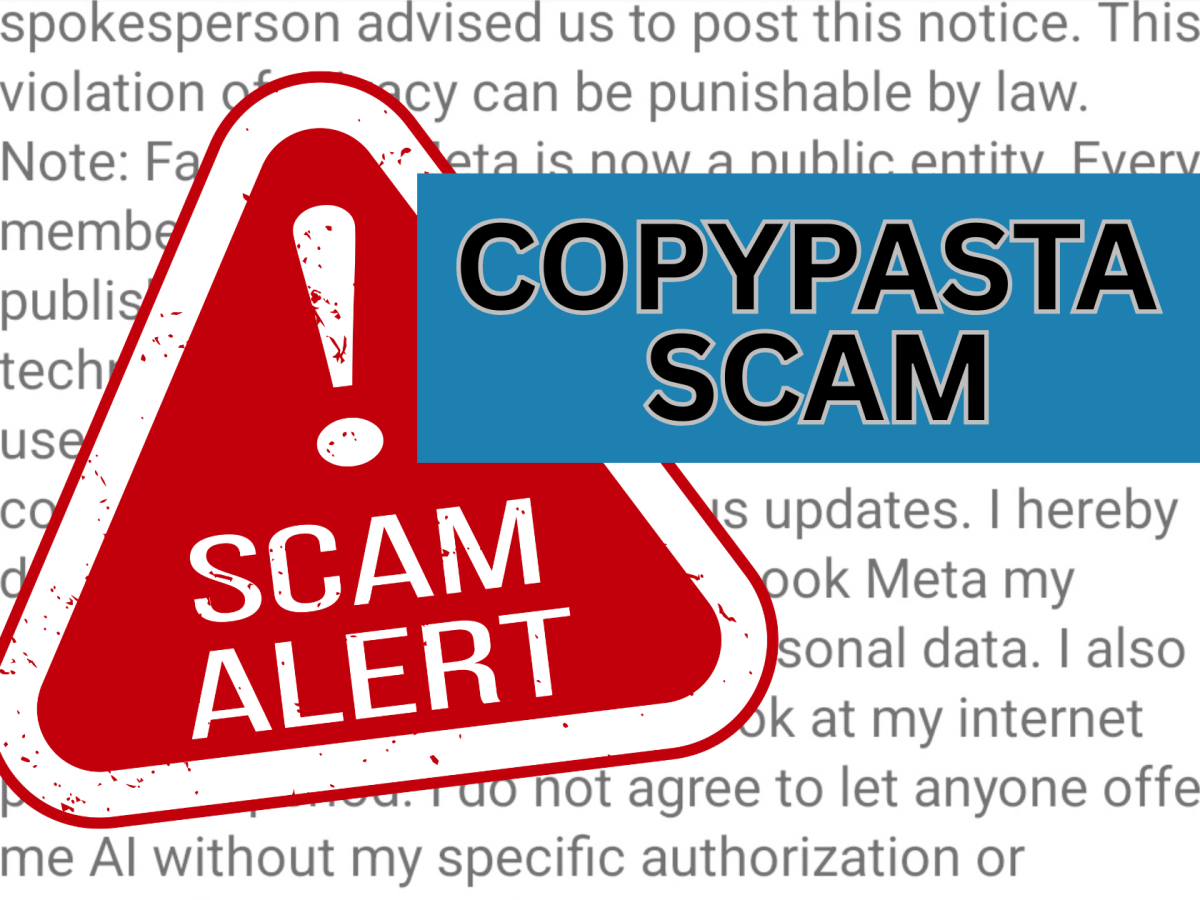
The Copypasta Scam: “60 Minutes” Facebook Post Is a Hoax
If you spend any amount of time on social media, you’ve probably seen one of these posts:
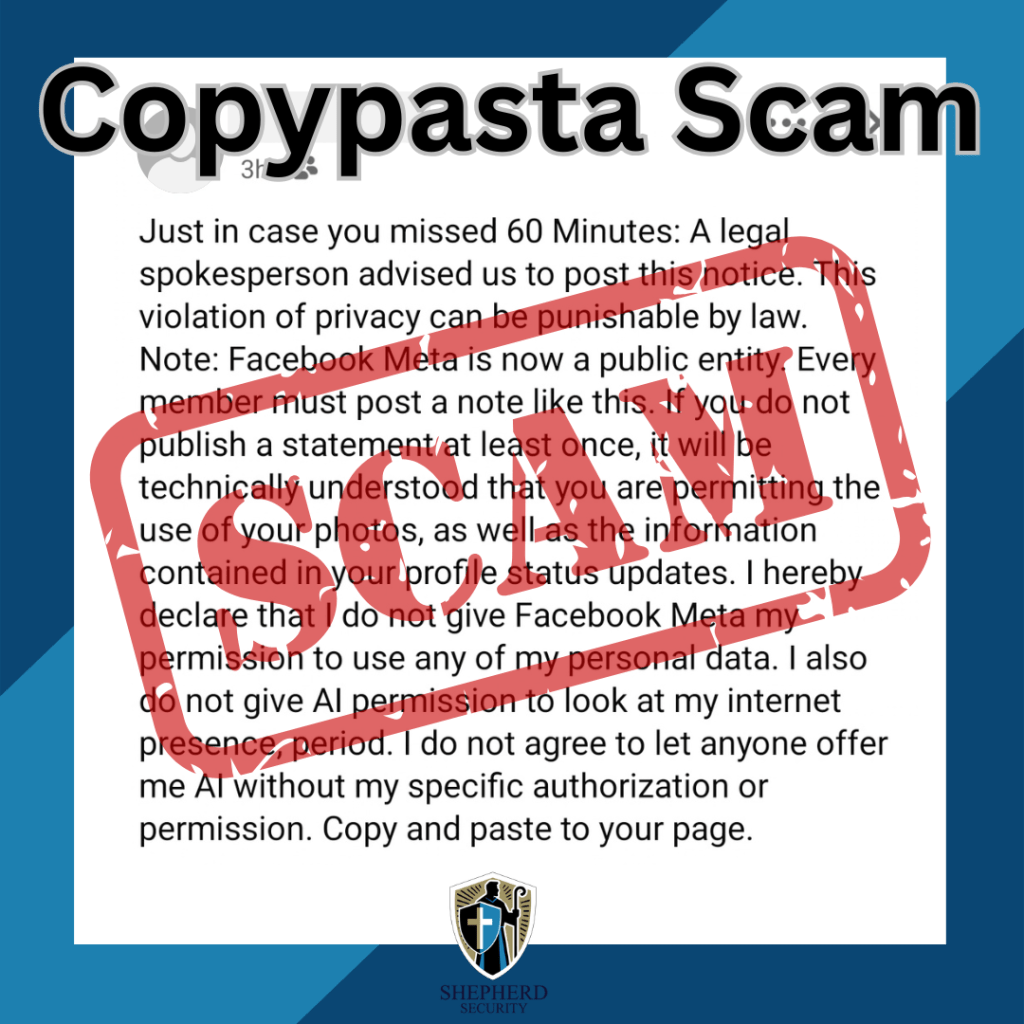
“Just in case you missed 60 Minutes… I do not give Facebook or Meta permission to use my photos, messages, or personal data…”
It usually continues with a long legal-sounding statement and ends with instructions to copy and paste it to your own profile to protect your privacy.
Right now, this particular post is spreading again across Facebook feeds.
Here’s the truth: it’s a hoax.
At Shepherd Security, we spend a lot of time talking about phishing and social engineering, but scams don’t always involve clicking a link or downloading malware. Sometimes they rely on human behavior and viral sharing. These are known as “copypasta scams.”
What Is a Copypasta Scam?
“Copypasta” scams are viral blocks of text that instruct users to copy and paste the message to their own profiles. They usually promise some type of benefit, such as:
- Protecting your privacy
- Resetting social media algorithms
- Seeing more posts from friends
- Removing ads
- Winning a giveaway
- Helping a charity or emergency situation
These posts spread rapidly because they look believable, feel urgent, and are often shared by well-meaning friends and family.
But the reality is simple: copying and pasting text cannot change how a social media platform works.
The Truth About the “60 Minutes” Facebook Post
The current version circulating begins with:
“Just in case you missed 60 Minutes…”
It claims that posting a legal notice will prevent Facebook (Meta) from using your photos, messages, or personal information.
Here are the key facts.
1. It Has No Legal Standing
Posting a statement on your Facebook profile does not override the terms of service you agreed to when creating your account.
When you signed up for Facebook, you already accepted Meta’s user agreement and privacy policies. A copied paragraph on your timeline cannot change that contract.
Please take the time to read Facebook/Meta Terms https://www.facebook.com/terms/
2. The Information Is Misleading
The message is designed to sound official and urgent, often referencing legal language, copyright laws, or news sources like “60 Minutes.”
However, there is no such broadcast warning people to post this message.
This exact hoax has been circulating for years, periodically resurfacing with slightly different wording.
3. It Doesn’t Protect Your Privacy
If you want to control your privacy on Facebook, the only place to do that is inside your account’s privacy settings.
Copying text onto your timeline does nothing to your privacy configuration.
4. The Best Response: Ignore It
If you see the post:
- Ignore it
- Delete it if you posted it
- Avoid copying and pasting it
At best, it wastes time. At worst, it contributes to misinformation spreading online and makes you a target for other social engineering attacks. (More on that below)
Common Types of Copypasta Scams
The “60 Minutes” post is just one version of a broader category of social media hoaxes.
The Algorithm / “See More Friends” Hoax
These posts claim that copying a message will make you see more posts from friends instead of ads or pages.
Reality: Social media algorithms cannot be changed by pasted text.
The Privacy / Copyright Notice
This is the category the “60 Minutes” message falls into.
It usually claims that posting a legal notice will protect your photos, data, or personal content from platforms like Facebook or Meta.
Reality: This has zero legal effect.
Viral Misinformation Hoaxes
These posts often involve:
- Missing children
- Dangerous criminals
- Celebrity deaths
- Public safety warnings
They pressure users to copy or share the message quickly to warn others.
Many of these posts circulate for years after the events are no longer relevant—or were never real in the first place.
Fake Charity or Giveaway Posts
These claim that if you copy and paste a message you might:
- Win money or prizes
- Help someone in need
- Unlock a special promotion
Often these posts eventually direct users to phishing websites or scam products.
Why Copypasta Scams Are Dangerous
Even though they seem harmless, these posts can create real cybersecurity risks.
1. Data Harvesting
Scammers monitor who interacts with these posts.
People who repeatedly share viral hoaxes may be more likely to fall for phishing or social engineering attacks later.
2. Mapping Social Networks
By tracking how posts spread, scammers can identify clusters of connected users, helping them target communities or organizations more effectively.
3. Spreading Misinformation
These posts clutter social feeds with false information, making it harder to identify real threats or legitimate warnings.
4. False Sense of Security
The biggest danger is psychological.
People believe they’ve protected their privacy, which can lead them to ignore actual security settings and legitimate warnings.
How to Spot a Copypasta Scam
Before sharing anything online, look for these red flags:
🚩 It tells you to copy and paste the message
🚩 It promises to change algorithms, privacy, or ads
🚩 It uses urgent or legal-sounding language
🚩 It claims a news source reported it but provides no proof
🚩 It pressures you to repost quicklyIf you see these signs, it’s almost certainly a hoax.
How to Verify Suspicious Posts
A quick check can prevent misinformation from spreading.
- Search the text online
Copy a sentence and paste it into Google. - Check fact-checking sites
Sites like Snopes regularly document viral hoaxes. - Use the Share button instead of copy/paste
Legitimate information is normally shared directly from the original source. - Don’t assume it’s true just because a friend posted it
Even well-meaning people share misinformation.
Final Thoughts
Cybersecurity threats don’t always come from hackers breaking into systems. Often they come from misinformation spreading through social networks.
Copypasta scams like the “60 Minutes” Facebook post rely on a simple tactic: getting people to react before they think.
Before copying or sharing anything online, take a moment to pause and verify. A few seconds of skepticism can stop a scam from spreading to hundreds of other people.
If a social media post asks you to copy and paste it to protect yourself… it’s probably a scam.
Stay aware. Stay skeptical. Stay secure.
-







 shepherdsecurity.net