
Phishing Attacks
(Email, SMS, and Voice)
Cybercriminals don’t rely on just one method to trick people. Most phishing attacks fall into three common categories, each using a different communication channel to deceive victims.
Email Phishing
This is the most widely known form of phishing. Attackers send emails that appear to come from trusted organizations such as banks, delivery companies, or even coworkers. These messages often contain malicious links or attachments designed to steal login credentials or install malware.
SMS Phishing (Smishing)
Smishing uses text messages instead of email. These messages often claim to be from banks, shipping services, or account providers and include a link urging you to verify a payment, confirm a delivery, or resolve an account issue. The goal is to trick you into clicking a malicious link or sharing personal information.
Voice Phishing (Vishing)
Vishing occurs over phone calls. Attackers may impersonate bank representatives, IT support, or government officials and attempt to pressure victims into revealing sensitive information such as account numbers, passwords, or verification codes. Caller ID can also be spoofed to make the call appear legitimate.
The common thread:
All three methods rely on deception, urgency, and impersonation to get you to act before you stop and verify the request. Taking a moment to pause and confirm the source can prevent a costly mistake.
Below are some common flags to look out for in these common attacks to keep yourself, your organization, and your loved ones protected
Email Phishing
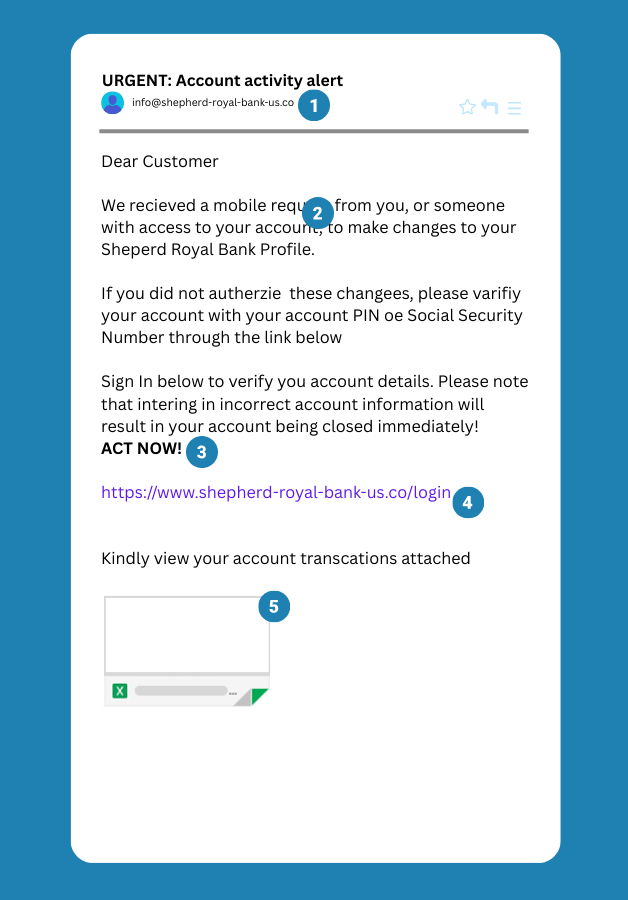
1. Unusual Email Address
Slow down and take a closer look. Does that email address really look like something your bank would use? Be cautious with unexpected messages, especially when they come from addresses that don’t match the ones you normally interact with.
2. Misspelled Words
Do a quick spot check. Misspelled words, awkward phrasing, or strange grammar can be strong indicators of an impersonator. Legitimate businesses typically proofread their communications and use proper spelling and grammar.
3. Scare Tactics
Stay calm. If an email tries to pressure you with urgent threats — like warnings that your account will be closed or that your security has been compromised — it’s a strong sign you’re dealing with a scam.
4. Suspicious URLs
Pause for a moment — a lot of business will never ask you to log in through an email link. Phishing messages often hide malicious websites behind deceptive URLs. If you weren’t expecting the email, don’t click the link.
5. Unexpected Attachments
Something’s fishy — watch out for unexpected email attachments, especially if you didn’t request them. Phishing emails often include attachments that can contain malware designed to compromise your device or steal your personal information.
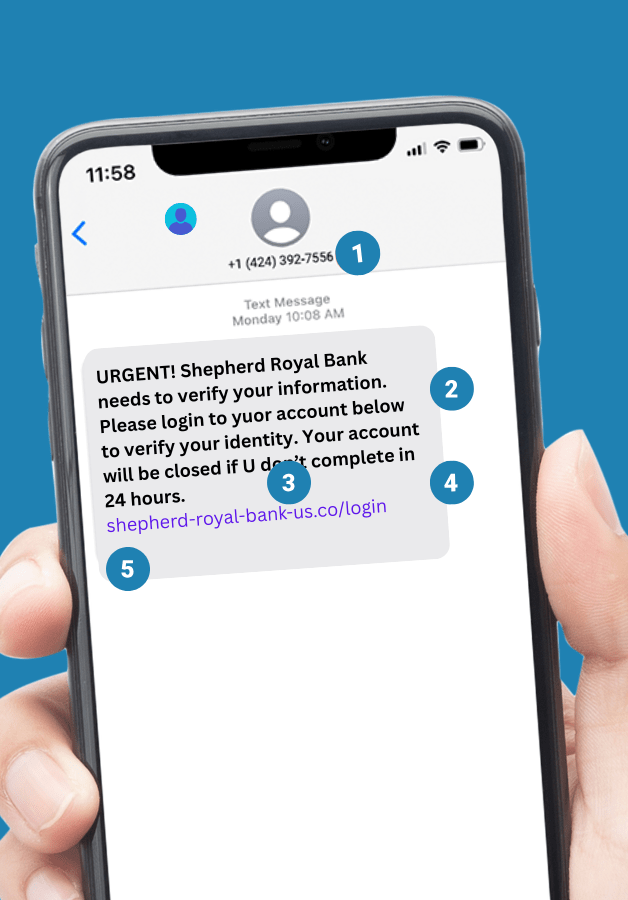
Smishing (SMS Phishing)
1. Strange Phone Numbers
Slow down. Does that number look like one the company normally uses to text you? Many legitimate alerts come from short codes—usually 4–6 digit numbers used for automated notifications. Messages from random phone numbers or unfamiliar senders can be a sign of a smishing attempt.
2. Urgent Warnings or Requests
Take a breath. Smishing texts often try to create panic — warning that your account will be locked, a payment failed, or suspicious activity was detected unless you act immediately. Messages that pressure you to click a link or log in right away are a common sign of a scam. Legitimate alerts won’t rush you into reacting.
3. Odd Grammar or Spelling Mistakes
Spot check it. Misspelled words, strange phrasing, or awkward grammar are common signs of an impersonator. Legitimate organizations typically proofread their messages and use clear, professional language.
4. Requests for Personal Information
If a text asks for personal or sensitive information—like account numbers, PINs, passwords, or Social Security numbers—it’s almost certainly a scam.
5. Suspicious Links
Be suspicious of links in texts. Don’t click them. Instead go directly to the businesses official website or login with confirmed safe methods.
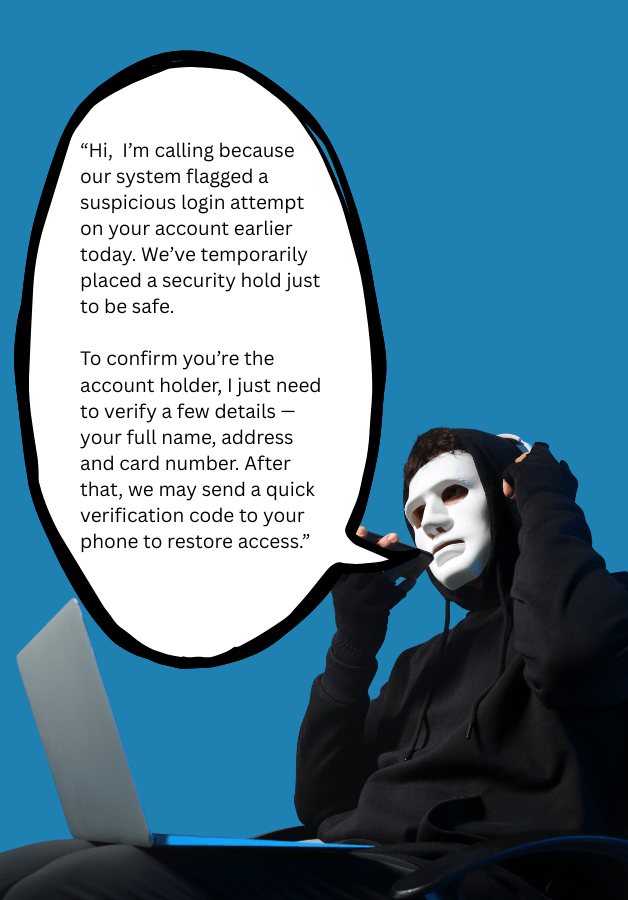
Vishing (Voice Phishing)
Unexpected Attachments
While caller ID can be spoofed, legitimate organizations typically call from recognizable numbers or display a clear company name. If you receive a call from an unfamiliar or suspicious number claiming to be from a bank, government agency, or company, approach it with caution. When in doubt, hang up and contact the organization directly using the official number listed on their website.
Scare Tactics or Threats
Vishing calls often rely on creating a sense of urgency. If a caller pressures you to act immediately or threatens negative consequences—such as account suspension, fraud charges, or legal trouble—take it as a warning sign. Don’t engage with the caller. Hang up and contact the organization directly using the official phone number listed on their website, account statement, or the back of your card.
Asking for Personal Information
Legitimate organizations will rarely ask for sensitive information during an unexpected phone call—and they should never ask for things like your PIN, password, or one-time verification codes. Be especially cautious if a caller requests account numbers, login credentials, or security codes. Never share confidential details unless you initiated the call using an official phone number listed on the organization’s website or on your account documents.
Calling you Unexpectedly
Be cautious of unexpected calls from someone claiming to represent a company, bank, or government agency. While legitimate organizations may contact you, attackers often rely on unsolicited calls to catch people off guard. If you receive a call you weren’t expecting, it’s safest to end the conversation and contact the organization directly using the official phone number listed on their website or your account documents.
 shepherdsecurity.net